Account Rotation Guide
You can find Rotation in the Admin tab. This feature lets your accounts take turns running, so you don’t need all your emulators open at once. This helps reduce RAM usage.
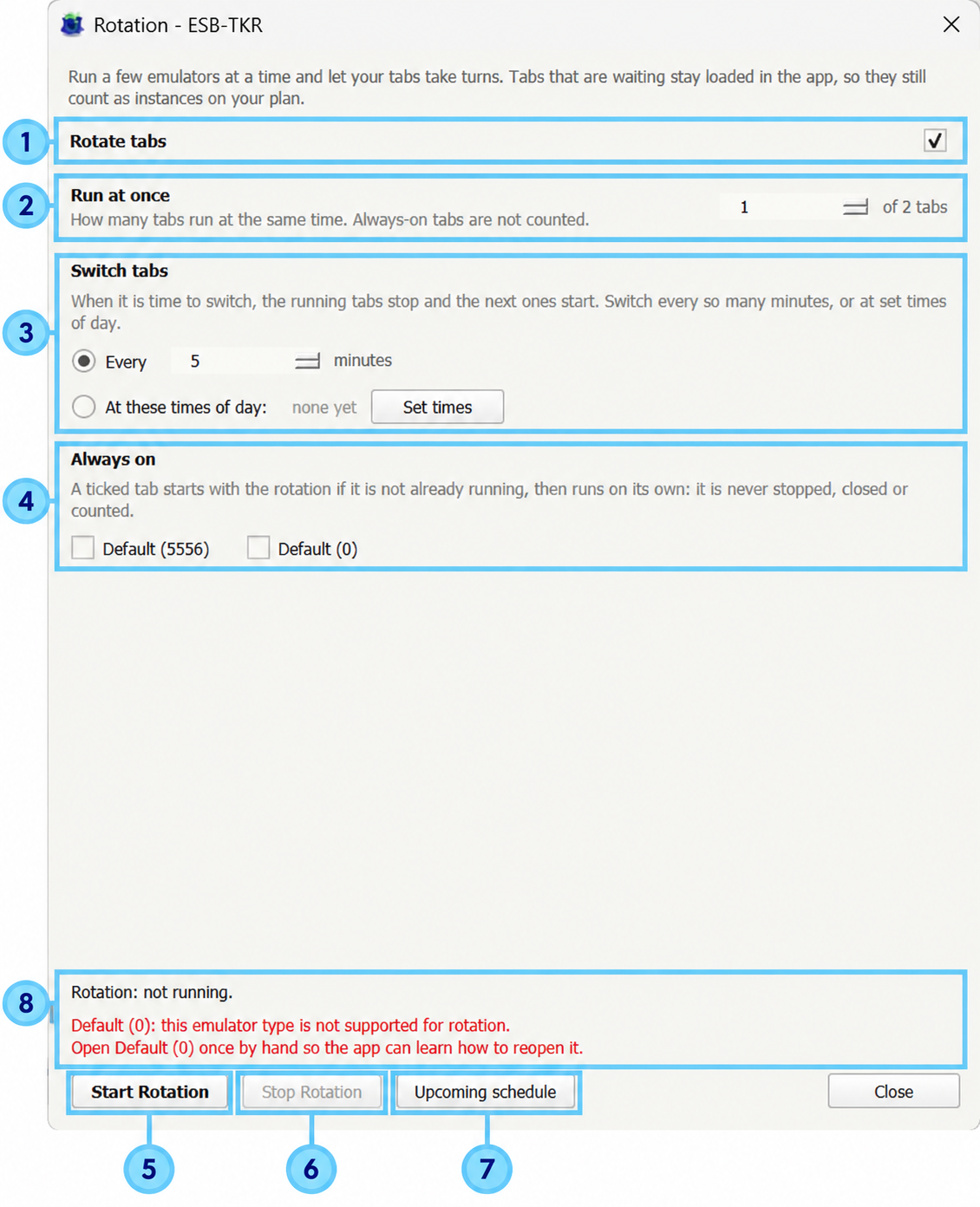
- Rotate tabs Enable this to let your accounts take turns automatically.
- Run at once Choose how many rotating emulators run together. Setting this to 2 means two run while the others wait. Always-on accounts are extra and do not count toward this number.
- Switch tabs
Choose when the next accounts take over:
- Every X minutes: switch regularly, such as every 30 minutes.
- At these times of day: click Set times to choose specific switching times.
- Always on Tick accounts you want to keep running without taking turns. Rotation starts them if needed and won’t stop or close them. Example: 2 rotating accounts + 1 always-on account = 3 emulators running together.
- Start Rotation Starts the rotation schedule. The bot closes emulators waiting for their turn, then opens and starts the first group. Always-on accounts keep running.
- Stop Rotation Stops automatic switching. Accounts already running continue to run.
- Upcoming schedule Shows which accounts will run next and when they will switch.
- Status and messages Shows whether rotation is running, the next switching time, or any issue preventing it from running. Read any instructions shown here.
Example 1: Four accounts taking turns in pairs
- Run at once: 2
- Switch tabs: every 30 minutes
- Always on: none
Click Start Rotation. Accounts 1 and 2 run first. After 30 minutes, they stop and close, and accounts 3 and 4 start. The groups keep taking turns. Only 2 emulators run together, but all 4 tabs still count toward your plan.
Example 2: Main account stays on while three farms take turns
- Run at once: 1
- Switch tabs: every 60 minutes
- Always on: tick your main account
Your main stays running. Farm 1 runs for an hour, then farm 2, then farm 3, and the cycle repeats. 2 emulators run together: your main + 1 farm. All 4 tabs still count toward your plan.
Important: manually starting or stopping a tab stops rotation. Click Start Rotation when you’re ready to resume.