







Automation Modes
Join Rallies Guide
Join alliance rallies automatically with boss avoidance, preset rotation, stamina consumption, rally mode type and list general settings.
On this page

How to Use
Follow the steps below to understand and take advantage of this mode.
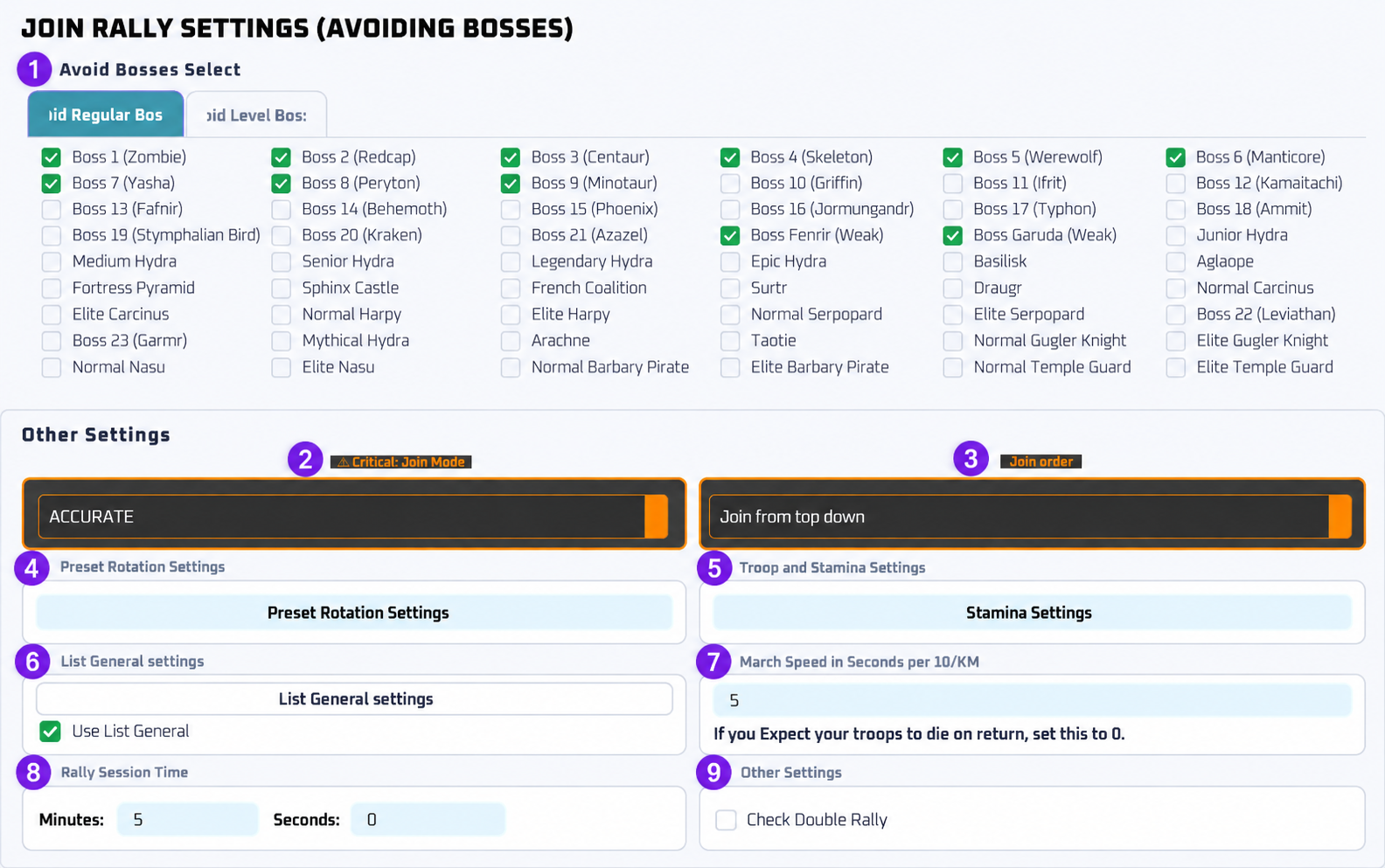
Avoid Bosses:
- Pick some bosses you would like to avoid. You can pick the level of Vikings and all sorts of event bosses too!
- Power Start and Power End is power in millions. That means the viking power you want to avoid. 0-999 means you don't want to join vikings between 0 million and 999 million power. If you want to join all vikings just uncheck this!
Preset Rotation Settings:
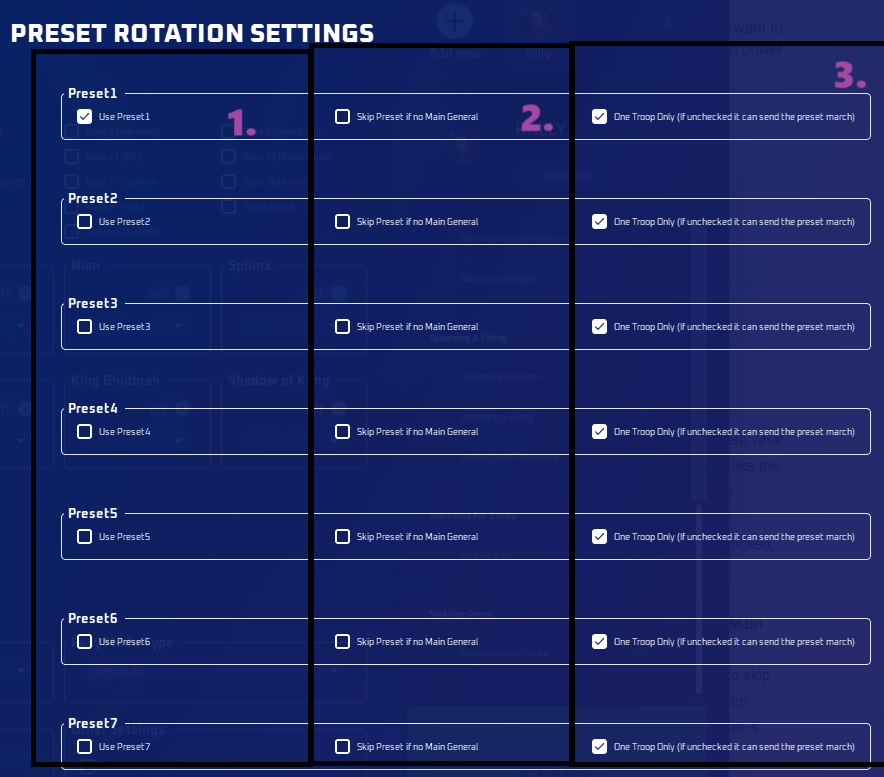
Use Preset:
- You can select here what presets you would like the bot to use or rotate through.
[!WARNING]
If no preset is picked, it won’t join rallies.
Skip Preset if no Main General
- You can choose to skip the preset if the main general in the preset is not available.
One Troop Only:
- This will reset the preset and pick the top 1 troop.
[!WARNING]
If unchecked, it will send full preset march.
Join Order Choose which direction the bot checks the rally list:
- Join from top down: Starts at the top and checks rallies downward.
- Join from bottom up: Starts at the bottom and checks rallies upward.
Both options still follow your avoided bosses and other rally settings.
Stamina Consumption Settings
- Controls how the bot uses stamina items during auto battles or farming. You can set how much stamina to spend per cycle and which item sizes to prioritize.
Mode
- Don’t Consume Stamina – Disables stamina use.
- Consume Max Stamina – Refills stamina to max automatically.
- Consume One Stamina – Uses only one stamina item per cycle.
Allowed Items
Choose which stamina items the bot can use: 100x, 50x, 25x, and 10x.[!TIP]
Combine different sizes based on your inventory.
Consumption Order
- Largest → Smallest – Uses bigger stamina items first.
- Smallest → Largest – Uses smaller stamina first.
Rally Mode Type:
- Accurate: The normal way of joining rallies which will read time and bosses. This is the same as before and the traditional way of how it's always been done.
- Fast: A dumbed down version. It won't care about the time but will still follow the avoided bosses. However, it will only join boss monster rallies still and won't join pvp rallies. All other rally settings apply.
- Join by AC: Same as before.
- Reset join card: This will only wait and reset the auto join rally card every hour.
Use List General:
- This will use either the top general in the list, or attempt to find the list of generals you selected when joining rallies; if your preset has a general out, it will do that.
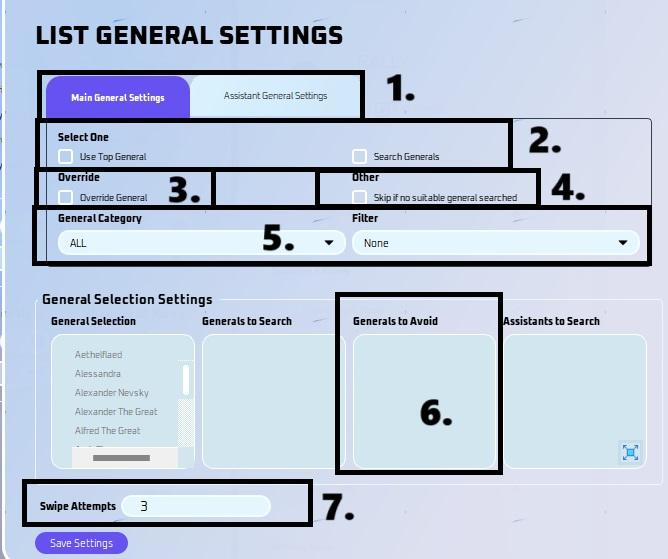
- List General Settings
- Pick here if this is for Main or Assistant General Settings.
- General Selection
- You can now select a list of generals you would like to search for when the general is not available in your preset.
- Override
- This has the ability to override the general in your preset or default march so that you can search for other generals.
- For Assistant General, click “remove assistant general” if you want to override preset general.
- Skip if no suitable general searched
- This will skip the boss if there are no suitable generals available based on your settings.
- General Category
- You can now filter by category (ALL, Development, Military, etc)
- You can now also filter by favorite or idle.
- Generals to Avoid
- You can now choose to avoid certain generals. This is used when selecting "Use top general". This won't matter for search generals due to the nature of it only searching for a specific general, thus naturally avoiding everything else.
- Swipe Attempts
- This is how many times it will swipe down to try and find the general you have listed.
- Take note, if you got a ton of generals, you need to increase the swipe amount, then again that will take even longer to join a rally.
March Speed in Seconds
- To help determine when the march is back from joining rallies.
- To check, go to the game and click 10 km and see how long it takes to march there.
- If you expect marches to die or return early, set 0 or low numbers.
Rally Session Time
- Set the duration for joining rallies here.
Check Double Rally
- This is mainly for users whose join buttons didn't update due to recent lag issues.
- A workaround for users who are encountering 24H rallies.